
We are aware that some groups may not be able to see their request list once logged into NAMS. We are working on the bug and anticipate the fix being deployed tomorrow morning by 9AM Eastern. We apologize for the outage the past few days. We greatly appreciate your patience.
There is a new login screen that will be the same for both the Member Dashboard and NAMS, as shown in the picture below.
It is recommended you manually enter your ID and password the first time using the new login screen. We have found some Passwords may need to be changed. Follow these steps to log in:
1. Open a new browser tab.
2. Clear your browser cache Control+Shift+Delete
and Reload Software Control+F5 or the circular arrow in upper left of the browser window
3. For the member dashboard go to www.qovf.org
For NAMS go to nams.qovf.org
4. Click on Member Sign in Button
5. Manually enter your Individual User ID and Password
If you are using an Apple product ensure you are using the Chrome browser.
If using a Password manager, you may need to delete your old password manager QOV entries and save the new log in entry.
If the above steps do not work, Reset your Password:
1. Click on the link at the bottom of the login window “Having Trouble logging in?”
2. Follow the reset password instructions. You should receive an email with a link from Neon to reset you password.
3. Do not use the following Special Characters + % or # as part your password.
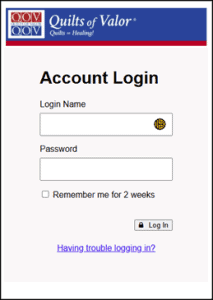
New Member sign in screen
